Session Reports - Web for Learners
The Session Reports tab allows you to review your past session reports.
How to Access Session Reports
Following these steps will help you access your session reports:
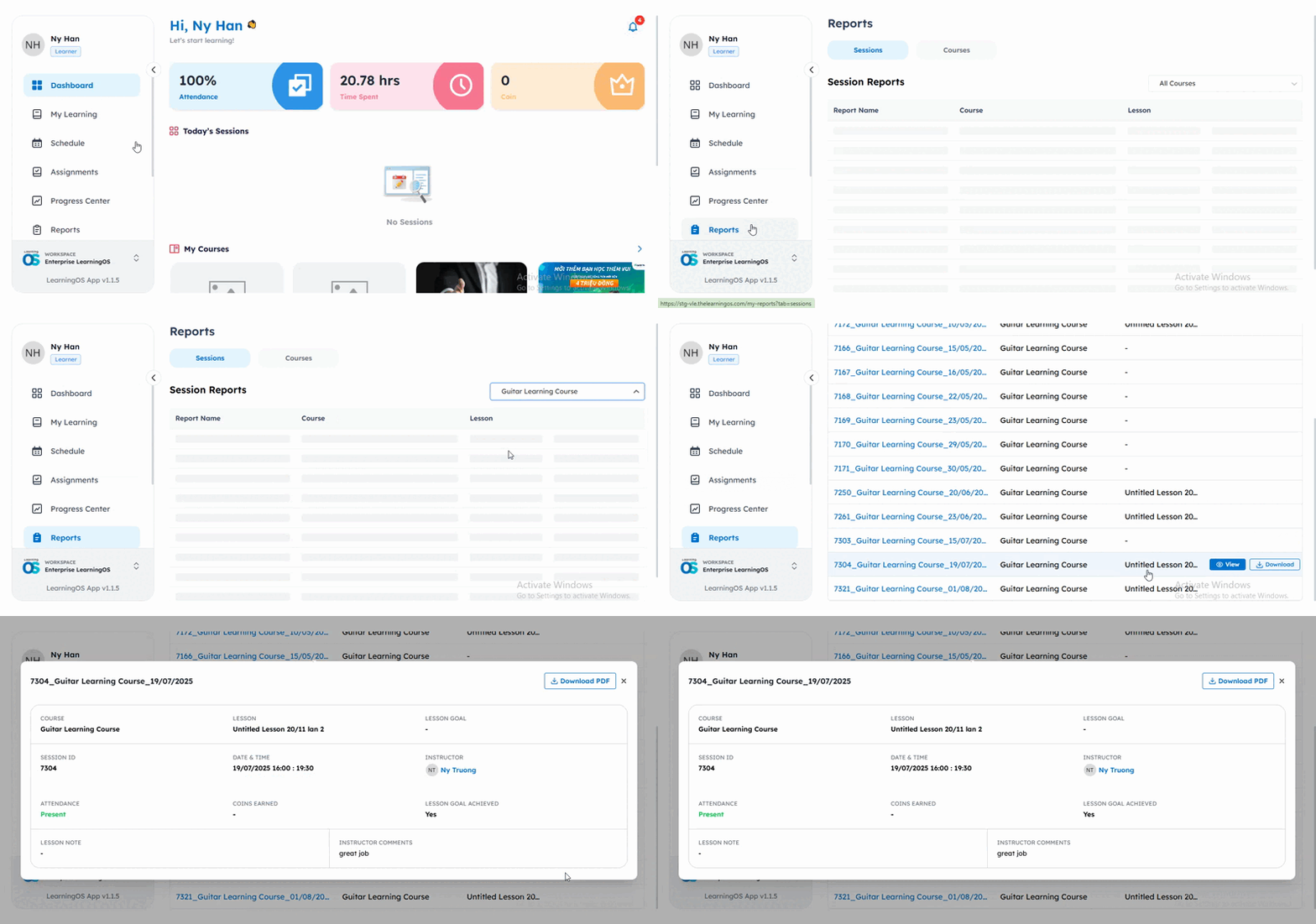
First, navigate to the Reports page by selecting it from the left menu. Then, locate and click on the Sessions tab to view your reports.
Once you're on the Sessions page, you'll find a comprehensive table displaying all your session reports. Each report entry contains important information including:
- The report name that identifies each session.
- The specific course associated with the session.
- The lesson name associated with that session.
To make your search easier, you can use the Course filter located at the top of the page to narrow down reports for specific courses.
How to View Report Details
When you want to examine a specific session in detail, simply hover over the desired report and click the View button. This will open the complete session report containing comprehensive information about your learning experience.
Each detailed report provides valuable information including:
- Course Name
- Lesson Name
- Lesson Goal
- Session ID
- Session Date & Time
- Instructor Name
- Attendance
- Coins Earned: The total amount of Automatic Coins and Additional Coins
- Lesson Goal Achieved
- Lesson Notes
- Instructor Comments
How to Download Session Reports
If you need to save or share your session report, you can easily download it as a PDF document. Simply hover over the report you want to save and click the Download button. Alternatively, while viewing a report, you can use the Download PDF button located in the top right corner of the screen.
Related Articles
Session Reports - Web for Parents
The Session Reports tab allows you to review your child's past session reports. How to Access Session Reports Following these steps will help you access your child's session reports: First, navigate to the Reports page by selecting it from the left ...Course Reports - Web for Learners
The Course Reports tab provides access to all reports from courses you have completed. Access Your Course Reports Here's how you can access your course reports: First, navigate to the Reports page by selecting it from the left menu. Then, select the ...Course Reports - Web for Parents
The Course Reports tab provides access to all reports from courses your child has completed. Access Your Child's Course Reports Here's how you can access your child's course reports: First, navigate to the Reports page by selecting it from the left ...Find Your Notifications - Web for Learners
The notification page in your Learner Portal helps you stay updated on important information about your courses, assignments, and activities. It's your personal message center! From the main dashboard, check the Up Next section for your latest ...Course Syllabus and Information - Web for Learners
The Course Information tab provides you with a comprehensive overview of your selected course, including its detailed description, structure, and your current learning progress. How to Access Course Information You can easily access the course ...